
Viewpoints panel
Apply Speeds
Push your walk speed, turn speed and field of view at the current view, in one keystroke.
What it does#
Navisworks resets navigation speed constantly: every recalled viewpoint brings its own, and a model in the wrong units makes walking either a crawl or a sprint. This puts your numbers back.
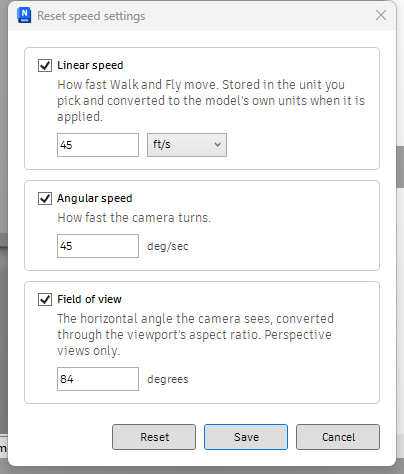
How to use it#
- Shift+Click once to set the three values. The defaults are 30 m/s, 45 degrees per second and 84 degrees. Untick any a reset should leave alone.
- Whenever walking feels wrong, press Alt+Q.
Limitations#
- Field of view needs a perspective view. In an orthographic one it warns and applies the two speeds only.
Good to know#
The unit dropdown converts the number rather than relabelling it, so switching m/s to ft/s turns 30 into 98.4252. The speed is stored in the unit you typed and converted to the document's units when applied, so it means the same thing in a model drawn in feet.
Source#
The tool's own files, word for word as shipped in Viewpoints.panel/Speeds.stack/Apply_Speeds.pushbutton. Every pyNavis tool is an ordinary bundle: copy these into your own extension and change what you like.
script.py Runs on a click. View on GitHub# -*- coding: utf-8 -*-
"""Pushes your saved walk speed, turn speed and field of view at the current view.
Which of the three actually move is up to the checkboxes in the settings
window (Shift+Click). The numbers live in lib/speeds.py, which Speeds to Saved
beside this one reads too, so the view on screen and the views saved in the
document can never be given different answers.
"""
import speeds
from pynavis import app, script, settings, toast
from pynavis import view as pnview
from pynavis._api import Api
def run():
doc = app.get_doc()
log = script.get_logger()
values = speeds.normalise(settings.load(speeds.SETTINGS_KEY, speeds.DEFAULTS))
wanted = speeds.summary(values)
if not wanted:
toast.info('Nothing to reset',
'All three are switched off in the settings (Shift+Click)')
return
view = doc.CurrentViewpoint.CreateCopy()
if values['change_linear']:
view.LinearSpeed = speeds.convert_linear(
values['linear'], values['linear_unit'], str(doc.Units))
if values['change_angular']:
view.AngularSpeed = speeds.angular_radians(values['angular'])
note = None
if values['change_fov']:
if view.Projection != Api.ViewpointProjection.Perspective:
note = 'Field of view needs a perspective view'
else:
# The AspectRatio on a copied viewpoint can be stale, and the whole
# conversion divides by it, so it is refreshed before it is read.
# pynavis.view.aspect_ratio does that refresh, and Speeds to Saved
# calls the same function: reading the ratio two different ways is
# how the two buttons once wrote lenses that differed by a fraction
# of a degree for the same setting.
ratio = pnview.aspect_ratio(doc)
height = None if ratio is None else speeds.vertical_fov(values['fov'], ratio)
if height is None:
note = 'Field of view skipped: the viewport aspect ratio was unusable'
else:
view.HeightField = height
doc.CurrentViewpoint.CopyFrom(view)
if note is None:
log.info('reset %s' % wanted)
toast.success('Speeds reset', wanted)
return
log.warning(note)
if values['change_linear'] or values['change_angular']:
toast.warning('Speeds reset', note)
else:
toast.warning('Nothing reset', note)
if '__commandpath__' in globals():
run()config.py Runs on Shift+Click. View on GitHub"""Shift+Click settings for both speed buttons.
The window itself is shared (extensions/pyNavis.extension/lib), because the
two buttons read one settings store.
"""
import speedsconfig
speedsconfig.edit()bundle.yaml The bundle contract: the keys pyNavis reads for this tool. View on GitHubtitle: Apply Speeds
tooltip: Push your saved walk speed, turn speed and field of view at the current view. Shift+Click to change them.
shortcut: Alt+Q
context: doc